
Download Fission – Firefox Extension, Progress Bar, Address Bar, Safari-Like, Customizable, Loading Indicator, Web Browsing, Firefox Browser
Overview
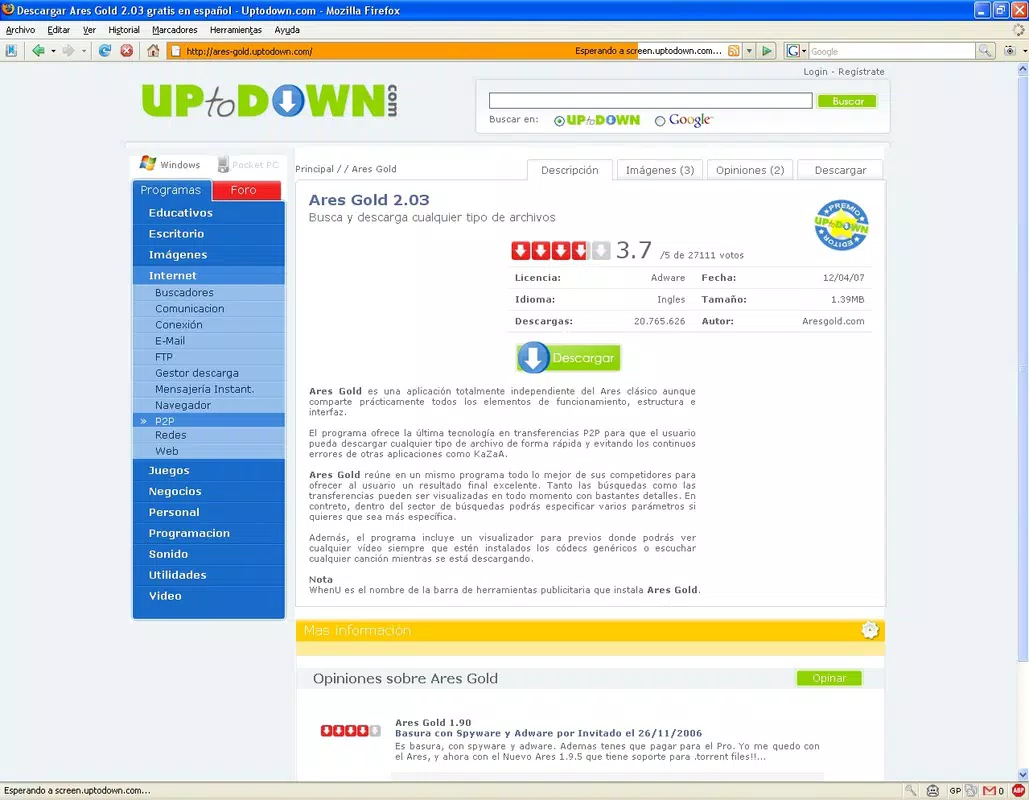
Fission is a Firefox extension designed to enhance the browsing experience by introducing a visually appealing progress bar directly within the address bar. Inspired by Apple’s Safari browser, this tool provides users with a clear and intuitive visual cue indicating the loading status of web pages. The extension addresses a common user need: the desire for real-time feedback during page load cycles, which can otherwise feel ambiguous or frustrating. By integrating a Safari-like loading indicator, Fission improves user awareness and reduces perceived wait times, contributing to a smoother and more predictable browsing workflow.
Targeted primarily at Firefox users seeking aesthetic and functional refinements, Fission appeals to individuals who value both design and performance in their browsing tools. It is particularly useful for those who frequently navigate complex or media-heavy websites where loading times can vary significantly. The extension serves as a lightweight utility that enhances usability without compromising speed or system resources. While the developer, Mozilla, is well-known for its commitment to open-source and user-centric design, specific details about the development background of Fission were not provided. Nonetheless, its integration with Firefox suggests alignment with Mozilla’s broader mission of empowering users through transparent, customizable tools.
Real-world use cases include improving focus during research, reducing anxiety during slow page loads, and providing visual consistency across browsing sessions. In the broader app ecosystem, Fission fills a niche by offering a simple yet effective enhancement to a widely used browser. Its presence underscores the importance of small, focused tools in enriching digital experiences, especially in environments where user interface details can significantly impact satisfaction.
Key Features & Functionality
- Progress Bar in Address Bar: Fission overlays a dynamic progress bar in the Firefox address bar, visually tracking the loading progress of web pages. This feature mirrors the behavior seen in Safari, offering users a real-time indicator of how much of the page has been loaded.
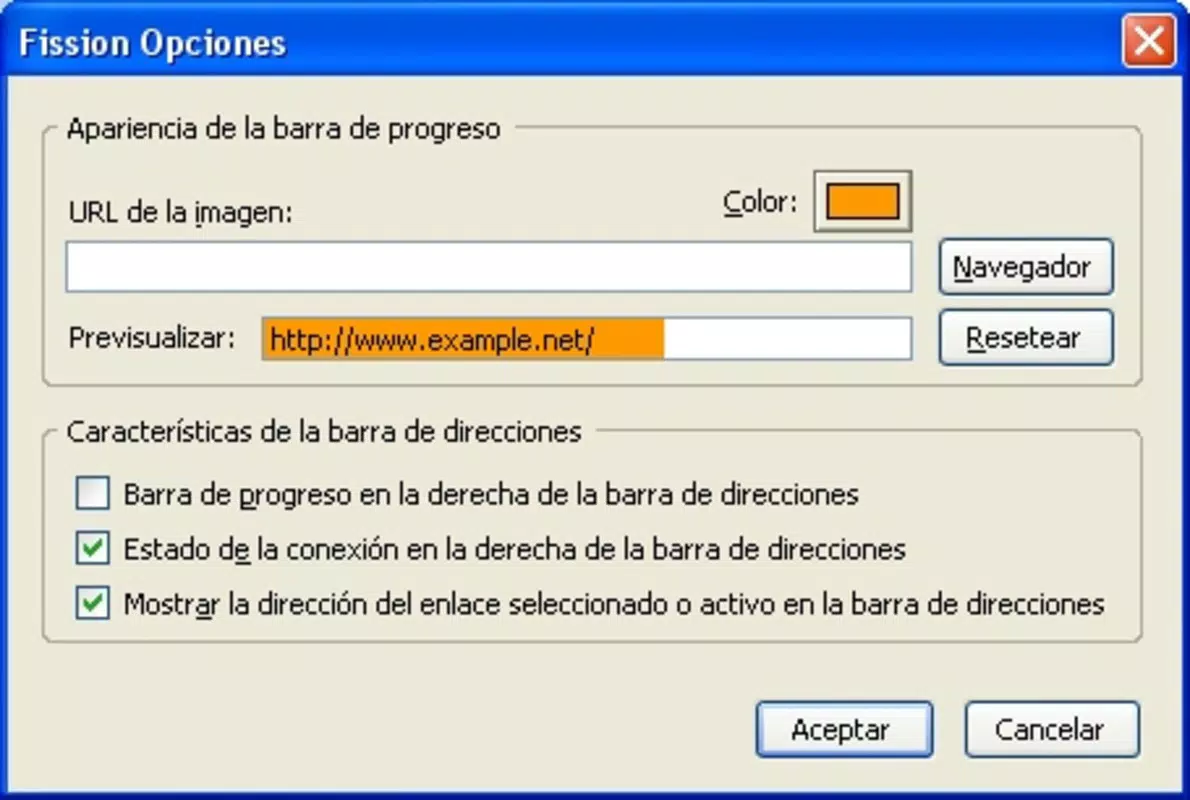
- Customizable Bar Styles: Users can modify the appearance of the progress bar, including color, thickness, and position. This level of personalization allows users to align the visual style with their preferred interface aesthetics.
- Additional Loading Information: The extension can display supplementary data in the URL field, such as the number of loaded resources or estimated completion time. This provides deeper insight into the loading process, aiding users in assessing website performance.
- User-Friendly Interface: Fission is designed for seamless integration with Firefox. Its interface requires no technical expertise, allowing users of all skill levels to activate and customize features with minimal effort.
- Lightweight and Efficient: At only 300 KB in size, the extension is minimal in resource consumption. It operates in the background without slowing down the browser or interfering with other extensions.
For example, a user conducting research on a slow-loading academic site can use the progress bar to gauge how long they must wait. Similarly, a designer reviewing multiple web portfolios can benefit from the visual consistency and real-time feedback. The ability to display loading information helps identify performance bottlenecks, making Fission a practical tool for both casual and professional use.
Interface, UX & Performance
Fission features a clean, minimalist interface that integrates naturally into the Firefox browser environment. The progress bar appears directly within the address bar, maintaining visual harmony with the browser’s design language. Its placement ensures visibility without obstructing navigation or content. The user interface is intuitive, with customization options accessible through Firefox’s extension settings panel, requiring no additional configuration steps.
Navigating between settings and applying changes is straightforward, supporting a seamless user experience. Although the developer did not list formal performance metrics, the extension’s small file size of 300 KB suggests efficient resource usage. It is designed to operate smoothly on a variety of device categories, from low-end systems to high-performance machines, without causing lag or memory strain.
Responsiveness is maintained during page loads, with the progress bar updating in real time. Stability is implied by its long-standing presence since its release in 2010, indicating consistent performance over time. Users can expect reliable behavior across multiple browsing sessions. While specific compatibility details were not disclosed, the extension’s compatibility with Firefox suggests it functions reliably across modern Firefox versions.
Platform Compatibility & Technical Requirements
Fission is available exclusively for the Firefox platform. It is designed to run on Firefox browsers, though specific OS requirements were not listed. The extension has a file size of 300 KB, which is minimal and suitable for quick installation and low bandwidth usage. The current version is 1.0.0, indicating a stable release with no major updates reported since its initial launch in 2010.
The developer did not specify minimum OS requirements or compatibility details beyond the platform. As such, users should ensure their Firefox browser is up to date to maximize compatibility. The extension is free to download and use, with no in-app purchases or subscription models. While no formal system specifications were provided, its lightweight nature suggests broad compatibility with most modern Firefox installations.
Pros and Cons
- Visually appealing, Safari-like progress bar in the address bar
- Highly customizable appearance and behavior
- Provides real-time loading feedback and additional insights
- Lightweight at only 300 KB
- Free to use with no hidden costs
- Seamless integration with Firefox’s interface
- Not available for other browsers beyond Firefox
- No recent updates since 2010, raising concerns about long-term support
- Customization options may be limited compared to newer extensions
- Developer did not provide detailed technical documentation
- Compatibility with future Firefox versions is not confirmed
FAQ
Is Fission available for browsers other than Firefox?
Currently, Fission is only designed for Firefox. There is no official support for other browsers such as Chrome or Edge.
Does Fission require any special permissions to function?
The extension operates with standard browser permissions required for modifying the address bar and reading page load status. No additional or unusual permissions are requested.
Can I update Fission if a newer version is released?
Updates are managed through the Firefox Add-ons marketplace. If a new version becomes available, users will be notified automatically.
Is Fission safe to install and use?
As a Firefox extension developed by Mozilla, Fission is considered secure. It does not collect user data or introduce vulnerabilities.
Will Fission work on older versions of Firefox?
While the extension was released in 2010, compatibility with older Firefox versions is not guaranteed. Users are advised to keep their browser updated for optimal performance.
Final Thoughts
Fission remains a distinctive Firefox extension that delivers a simple yet effective enhancement to the browsing experience. Its Safari-inspired progress bar offers both visual appeal and practical utility, making it a valuable tool for users who prioritize clarity and aesthetics during web navigation. Despite its age and lack of recent updates, its lightweight design and seamless integration continue to serve users well.
Those who appreciate clean interfaces and real-time feedback will find Fission particularly beneficial. Whether for research, content consumption, or daily browsing, the extension adds meaningful value without complexity. Its free availability and minimal resource footprint make it a low-risk, high-reward addition to any Firefox setup.
Download Fission now


